Already a member? Log into your account
Get instant access to millions of hours of recorded video from hundreds of traffic cameras in Orlando, Florida.
Get Started TodayRoadProof is trusted by the best organizations across America.

















Are you part of a law enforcement agency? Get Roadproof now, for FREE. Click here to sign up.
With RoadProof, you can save thousands of dollars and hundreds of hours of time tracking down the video data you need, for whatever your end use case might be – whether it’s an accident case or criminal investigation.
Recorded video data that used to take days or weeks to find, can now be searched for, located and downloaded in a matter of minutes using the platform.
“The platform continues to be vital and a remarkable tool. It’s a great asset to our agency for all of our cases.”
Master Sergeant John A. Boos
Traffic Homicide Investigation, Florida Highway Patrol – Florida
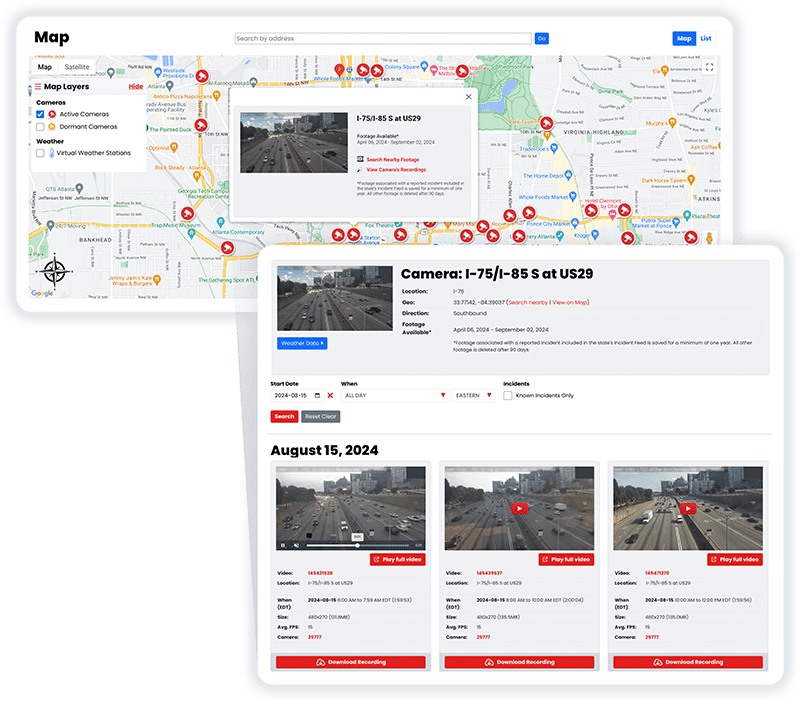
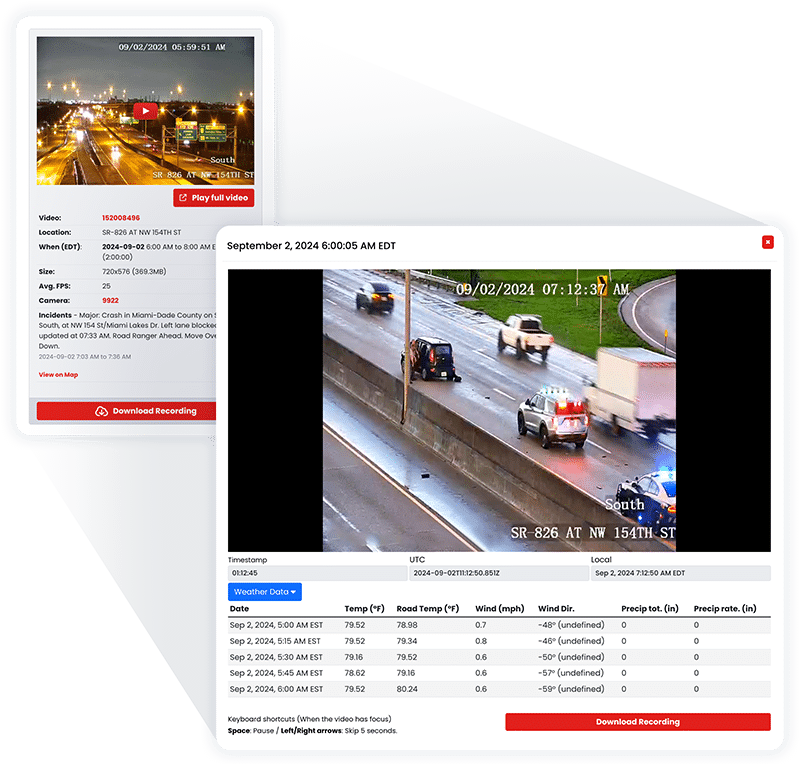
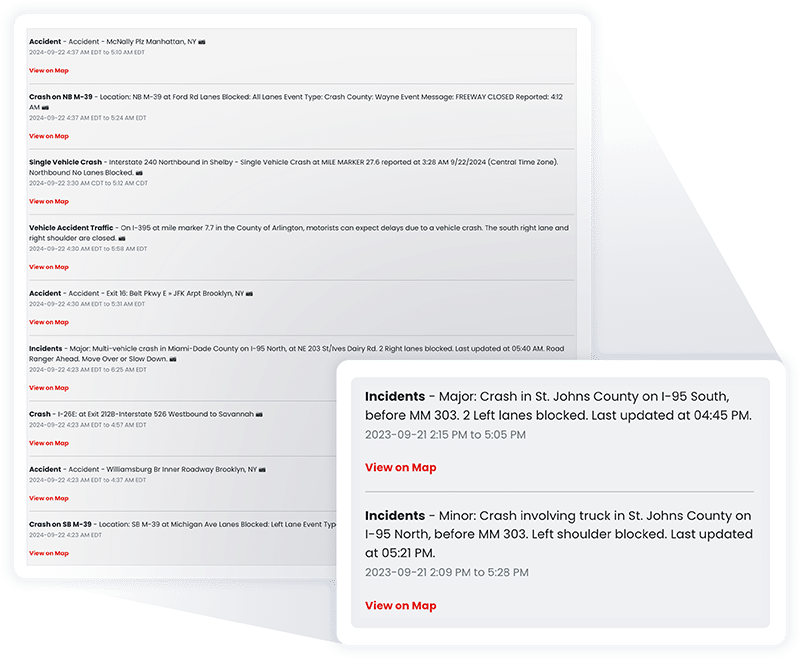
RoadProof offers a truly unique data set combining archived traffic video and a running incident feed available in most states on the system.
All of this data together allows you to get the whole picture, from the initial incident to the final outcome.
“IT WINS THE CASE. We saw the value of RoadProof immediately, you settle your cases 50% faster and for full value.”
Brian Labovick
Labovick Law Group – Florida
With our automated intelligence system, we’re able to match video footage from cameras nearby to any reported incident, and ensure that those vital video recordings are preserved in our archive for a minimum of one year.
While other systems only keep video footage for a couple of months, we keep the video footage that’s critical to your cases for much longer.
“Our case management department (which handles hundreds of cases each month) has nothing but praise for RoadProof.”
Kendra Fike
Bighorn Law – Nevada
Get started now to see how RoadProof can help you get the video data you need.
Get StartedAlready a member of RoadProof? Login here
“One of the first things I do when investigating a crash is obtain and preserve as much evidence as possible. Even before knowing all the parties involved, I immediately pull the RoadProof footage. Seeing the crash firsthand through the video is incredibly powerful. Having this video footage from the start really helps level the playing field between the plaintiff and the trucking company, which often delays or refuses to provide the truck camera video if at all.”
Jamie Mazzeo, Litigation Paralegal
The Truck Accident Law Firm – Florida


Get started now to see how RoadProof can help you get the video data you need.
Get StartedAlready a member of RoadProof? Login here
If you’re on the hunt for traffic camera footage in Orlando, Florida, you likely already know how difficult it is to find an Orlando traffic camera archive after an accident. Multiple agencies are operating cameras across the city, state law regarding access to recordings is unclear, and the window to obtain the video before it is destroyed is extremely limited. Below is information on how Orlando’s traffic camera system operates (what is recorded vs. what is not), how to submit requests for archived footage, and why platforms such as RoadProof exist to fill gaps left by government systems.
Cameras operated by various agencies watch Orlando’s roadways. Not all cameras function similarly. Below, we provide a brief overview.
The Florida Department of Transportation (FDOT) operates the FL511 Cameras; this is a statewide network of cameras located along major highways (I-4, SR-408, SR-50, etc.) which feed live video into the web so that motorists can view real-Time traffic conditions prior to leaving their homes. FL511 documents clearly indicate that video and images captured from its cameras will not be stored or recorded. Therefore, if you were involved in an accident on I-4 and hope FDOT has video of your accident, it likely won’t.
Both the City of Orlando and Orange County use cameras at intersections throughout the area. While many of these cameras do capture video, the amount of time that it will be retained varies. In fact, many jurisdictions retain video for only a couple of days prior to overwriting. Although policies vary between municipalities, there is no centralized system governing all of them.
Red light cameras are a completely separate beast. Red light cameras are activated when a vehicle crosses through an intersection after the light has changed to red. Two items follow from this: first, video will only exist for accidents involving vehicles entering an intersection after the red light has been triggered. Second, if your accident occurred while the red light was still green, then red light camera footage will not exist. Municipalities or vendors (such as Conduent/Verra Mobility) typically manage red light camera systems.
To put it simply: Most do not. When they do record, the footage does not exist for long.
As mentioned earlier, FDOT’s FL511 cameras do not store video. City and county cameras that record video will typically only retain footage for a couple of days. If you experience an accident and realize that having the video from one of these cameras could greatly aid your case, and you need to wait until after you figure out who to contact with regard to submitting a formal records request, then the chances are good that the footage has already been deleted.
Florida public records law does provide citizens with the ability to petition for copies of footage recorded by governmental agencies. The Mark Wandall Traffic Safety Act also sets forth parameters relative to the operation of red light camera programs. However, both laws address what citizens can seek, not how long those agencies are required to maintain it.
The reason why archived traffic camera footage is important after an incident is that it can help prove liability. In order to determine who was liable for an auto accident, you have to have some form of proof. Insurance companies will try to use the lack of proof as leverage to limit liability. Video evidence proves whether a light was red, if a driver failed to yield, or if a vehicle crossed into oncoming traffic.
As such, video footage helps remove liability ambiguity that insurance companies depend upon to limit claims. Accident lawyers who represent clients in accidents consistently report that when there is video footage, cases are settled much quicker and with better results than when there is no video. When there is video, settlements also tend to be larger than when there is no video.
In addition to settling insurance disputes, video footage from traffic cameras can provide critical information in hit-and-run accidents (video provides the only viable method for obtaining license plate numbers); during criminal investigations of road-related crimes; and in accident reconstruction. Video footage is not simply a “nice to have” but rather can be a determining factor in winning or losing your case.
If you want to obtain footage from a specific traffic camera in Orlando, follow these steps:
The type of agency responsible for operating the camera affects the manner in which a request should be submitted. The Florida Department of Transportation (FDOT) is generally responsible for traffic cameras located along state highways (such as I-4 and SR 408). Cameras at intersections are usually operated by the City of Orlando. Cameras in unincorporated areas of Orange County are operated by Orange County. Red light cameras are operated by private vendors. If you do not know who owns the camera, begin by contacting the agency responsible for managing the road where the camera is located.
Submit your public records request to obtain confirmation from FDOT, even if no video exists. Submit a public records request for city and county-owned cameras as soon as possible. You will typically need the date/time of the incident, the exact location of the incident (i.e., the intersection or mile marker), and a brief description of what you are looking for. Although Florida has very liberal public records laws, there is always a delay associated with processing records, and that delay may cause you to miss preserving potentially valuable evidence.
We cannot overemphasize this point. Many systems delete video evidence anywhere from 24-72 hours after recording. Each day you delay submitting your request is another day you may lose potential evidence. If you were involved in an accident, please submit your request as early as possible and ideally on the same day.
An attorney representing individuals injured in an auto accident or one seeking compensation for an accident-related loss understands which agencies to contact, how to escalate situations when those agencies fail to act in a timely manner, and how to preserve potential evidence via legal means. In many instances, using an attorney isn’t just beneficial; it can be necessary.
Traffic camera systems in Orlando are not designed to archive video for investigative/legislative purposes. RoadProof is.
RoadProof offers law enforcement agencies and licensed attorneys access to millions of hours of recorded video data from thousands of cameras nationwide. It was developed for those who would benefit most from having this type of footage, namely law enforcement agencies and licensed attorneys, and addresses the storage limitations inherent in government-based systems.
Both components (video and incident data) exist within one platform. Most other platforms offer either video and/or incident data.
One-year retention window. Local governments’ deletion policies result in deleted video footage being erased within days, whereas Roadproof uses intelligent automation software to match video from nearby cameras with reported incidents and stores that footage for a minimum of one year – providing sufficient time for litigation.
Search by location & download within minutes. Users can enter an address, an intersection, or coordinates to identify cameras near an incident and download available footage instantly. What previously took multiple days of phone calls and records requests can now be accomplished in mere minutes.
Access limited to professionals only. RoadProof is limited to law enforcement agencies and licensed attorneys. There are valid reasons for this restriction, including privacy/security issues surrounding video footage collected from traffic surveillance cameras. Limiting access to legitimate professionals reduces the risk of misuse.
Below are comments by professionals utilizing RoadProof:
“The platform continues to be vital and a remarkable tool. It’s a great asset to our agency for all of our cases.”
– Master Sergeant John A. Boos
Traffic Homicide Investigation, Florida Highway Patrol
“It wins the case. We saw the value of RoadProof immediately. You settle your cases 50% faster and for full value.”
– Brian Labovick
Labovick Law Group, Florida
“Our case management department, which handles hundreds of cases each month, has nothing but praise for RoadProof.”
– Kendra Fike
Bighorn Law, Nevada
Law enforcement agencies & licensed attorneys utilizing RoadProof can book a demo at RoadProof.com. If you are an individual seeking footage of your own accident, RoadProof can refer you to an attorney licensed in your state who can access the platform on your behalf.
Below is a list of major traffic cameras in and around Orlando. These cameras operate under real-time monitoring using FDOT’s FL511 program.
| Intersection / Location | Highway or Cross Street | Operator |
| SR-408 at Conway Rd | State Road 408 & Conway Rd | FL511 (FDOT) |
| I-4 at SR-408 | Interstate 4 & SR-408 interchange | FDOT |
| Anderson St at I-4 | Anderson St & I-4 | FDOT |
| Ivanhoe Blvd at I-4 Ramp | Ivanhoe Blvd & I-4 | FDOT |
| SR-50 at I-4 WB | State Road 50 & I-4 Westbound | FDOT |
Important note: The above cameras monitor in real-time and have no stored footage. Therefore, they should be viewed as monitoring tools versus archives. To obtain recorded video footage from any of the cameras listed above or other intersections in the area, please visit RoadProof.
Pre-Incident: Use FL511.com or any traffic app prior to driving to view real-time conditions on Orlando’s highway system. This may not assist you in the event of an incident; however, this is a habit worth developing.
Post-Incident: Immediately document the time and date of an incident. As you are waiting for the police department to arrive, observe the intersection and photograph any visible traffic cameras on poles, traffic control devices, or buildings. Documenting the location of these cameras may assist you and/or your attorney in determining which agency(s) to contact.
Do Not Wait to Request Footage: If possible, contact the applicable agency on the same day. Each passing day increases the likelihood that the requested footage has been deleted.
Contact a Professional: If the requested footage is critical to your case, do not attempt to personally navigate the public record requests. An attorney familiar with traffic cases will know how to act quickly, raise issues appropriately, and utilize platforms such as RoadProof that individual users cannot.
Be Respectful of Laws Regarding Footage: Traffic camera footage is protected under privacy laws. Authorized agencies include law enforcement, licensed attorneys representing a party to the case via appropriate legal process, and the parties themselves through a valid legal process. Do not share any footage received pursuant to a legal process without consulting with your attorney.
Get started now to see how RoadProof can help you get the video data you need.
Get StartedAlready a member of RoadProof? Login here
We will review your request within 1-2 business days and will contact you by either phone or email, or both. In the meantime, learn more about your team!