Already a member? Log into your account
Get instant access to millions of hours of recorded video & incident data from thousands of traffic cameras in Long Island, New York.
Get Started TodayRoadProof is trusted by the best organizations across America.


















Are you part of a law enforcement agency? Get Roadproof now, for FREE. Click here to sign up.
With RoadProof, you can save thousands of dollars and hundreds of hours of time tracking down the video data you need, for whatever your end use case might be – whether it’s an accident case or criminal investigation.
Recorded video data that used to take days or weeks to find, can now be searched for, located and downloaded in a matter of minutes using the platform.
“The platform continues to be vital and a remarkable tool. It’s a great asset to our agency for all of our cases.”
Master Sergeant John A. Boos
Traffic Homicide Investigation, Florida Highway Patrol – Florida
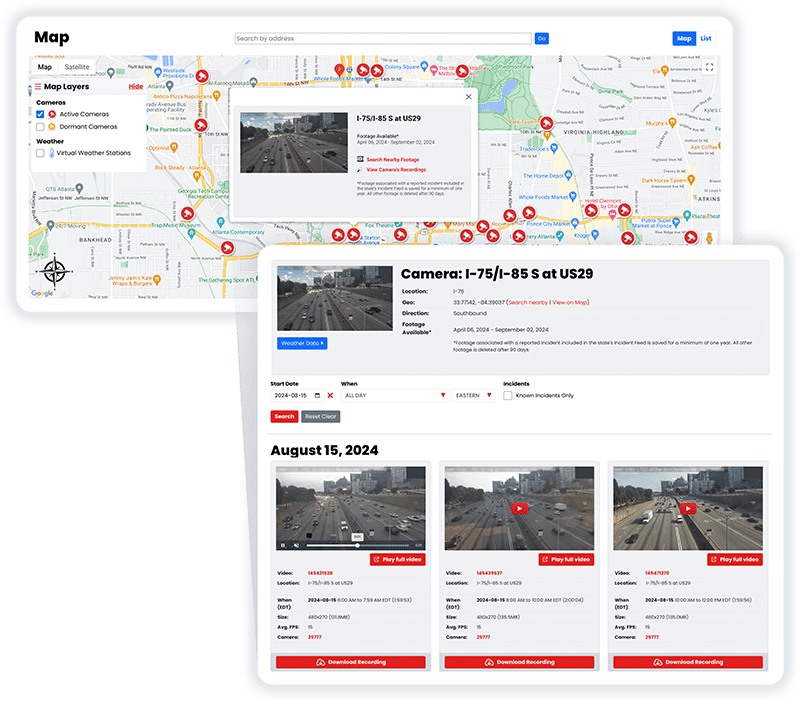
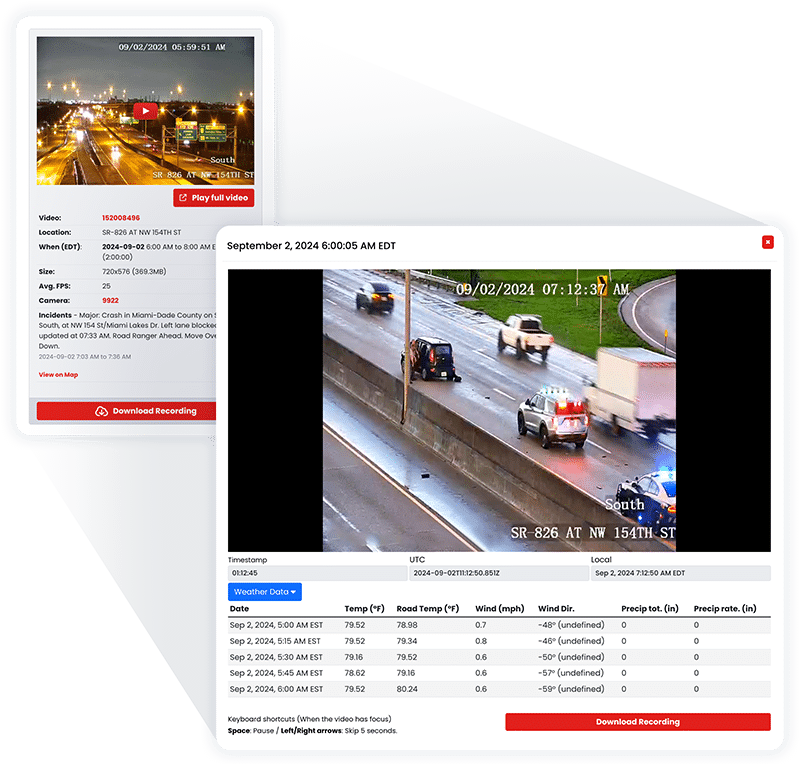
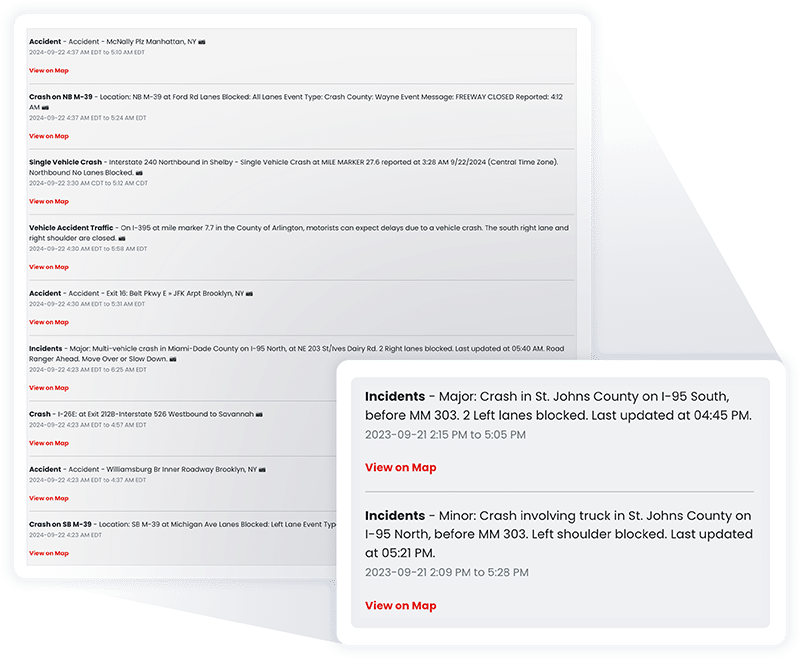
RoadProof offers a truly unique data set combining archived traffic video and a running incident feed available in most states on the system.
All of this data together allows you to get the whole picture, from the initial incident to the final outcome.
“IT WINS THE CASE. We saw the value of RoadProof immediately, you settle your cases 50% faster and for full value.”
Brian Labovick
Labovick Law Group – Florida
With our automated intelligence system, we’re able to match video footage from cameras nearby to any reported incident, and ensure that those vital video recordings are preserved in our archive for a minimum of one year.
While other systems only keep video footage for a couple of months, we keep the video footage that’s critical to your cases for much longer.
“Our case management department (which handles hundreds of cases each month) has nothing but praise for RoadProof.”
Kendra Fike
Bighorn Law – Nevada
Get started now to see how RoadProof can help you get the video data you need.
Get StartedAlready a member of RoadProof? Login here
“One of the first things I do when investigating a crash is obtain and preserve as much evidence as possible. Even before knowing all the parties involved, I immediately pull the RoadProof footage. Seeing the crash firsthand through the video is incredibly powerful. Having this video footage from the start really helps level the playing field between the plaintiff and the trucking company, which often delays or refuses to provide the truck camera video if at all.”
Jamie Mazzeo, Litigation Paralegal
The Truck Accident Law Firm – Florida


RoadProof’s Long Island traffic camera archive helps approved legal, insurance, reconstruction, and law enforcement professionals search supported recorded feeds by location, date, and time. The archive can help identify footage from incidents across Nassau and Suffolk counties, but availability depends on the camera, its direction, the condition of the feed, and the requested time.
This guide uses “Long Island” to mean Nassau and Suffolk counties. Incidents in Queens or Brooklyn should be researched through resources covering New York City.
RoadProof’s Long Island traffic camera archive is a valuable tool for licensed legal professionals, insurance companies, reconstruction firms, and police agencies as they look to find archived video data that supports their searches based on date/time/location. This archive allows users to find video records from all cameras across both Nassau and Suffolk counties; however, the amount of footage available from an incident will depend upon the specific camera(s), which direction it was filming, what condition the video feed was in at the time of the incident, and when during the day you are looking for.
Yes, past Long Island traffic camera footage may be available through an independent archive such as RoadProof. However, seeing a camera near an accident does not mean that a usable recording exists.
The camera may have been pointed in another direction. A vehicle, structure, weather condition, or glare may have blocked the view. The feed could also have been unavailable at the time of the incident.
Also, keep in mind that there is a distinction between real-time traffic views on cameras versus viewing previously recorded footage.
While 511ny.com provides real-time information via cameras on major roads throughout NY, and while these cameras do capture images of accidents in progress…they do NOT offer a mechanism for “replaying” previously viewed images.
On the other hand, RoadProof provides a service with a completely different goal. They record all supported traffic cams and organize this video into searchable formats (by location, date, and time), so that authorized professionals can search for specific video. So if you want to know whether any supported cam(s) has captured useful footage for a specified time frame, then a search using RoadProof is where to start.
| Source | Primary purpose | Access to past footage |
| 511NY | Viewing current traffic conditions | No public playback archive |
| RoadProof | Searching supported recorded feeds | Available when the relevant feed and time were archived |
| Enforcement camera portal | Reviewing evidence connected to a citation | Usually restricted to the cited violation and authorized recipient |
| Government records request | Requesting records held by an agency | Depends on whether the agency possesses a responsive recording |
A productive camera search begins with accurate incident information. An approximate location such as “the Long Island Expressway near Nassau County” will usually be too broad.
Gather as many of the following details as possible:
RoadProof allows an approved user to support cameras around a location. The user can then select the relevant date and time and determine whether archived video is available.
Do not limit the search to the precise minute listed in a police report. Crash times are often estimated, and watches, phones, dispatch systems, and camera systems may not display identical times. Searching a wider window can account for those differences.
There is no single public camera system responsible for every roadway, intersection, and traffic signal on Long Island. The operator often depends on the type of road and the camera’s purpose.
Region 10 for the New York State Department of Transportation (NYSDOT) is responsible for the two largest counties on Long Island: Nassau County and Suffolk County. Region 10 has an advanced system known as INFORM, which allows them to monitor traffic conditions in real time for some of the most congested roadways on Long Island.
Public views from cameras located throughout the state’s transportation infrastructure are made available to users at 511ny.com. Users may utilize these views to see how traffic congestion, construction, or weather impacts travel, as well as view current incident reports. The above views should never be used by anyone seeking to review historical footage.
The RoadProof records module is able to record an independent feed of supported cameras. Therefore, qualified personnel were able to research specific dates and times that were not available via live viewing.
In addition to those operated by the State of New York Department of Transportation, there are additional cameras that could be operated by Nassau County, Suffolk County, individual towns and villages, their respective police departments, transportation agencies, etc.
This is significant in determining which agency to send your request to. For example, if you want a video from a traffic incident, it would make sense to request it from the operator of the camera located nearest the location of the incident.
However, the cameras used for monitoring highways may be operated by one agency while cameras located near intersections in county roads may be operated by another agency. Cameras monitored by nearby agencies will appear very similar.
The images from enforcement systems like those in red light, speed, toll, and school bus cameras are not meant to be used interchangeably with images from general traffic monitoring cameras. Enforcement systems collect data on specific violations.
In some cases, access to this collected data may be limited to the vehicle’s owner, an authorized representative (i.e., a lawyer), or the person who received a formal notice from the enforcement system.
For instance, in Nassau County, if you receive a notice based upon evidence recorded by a red light camera, you can look up all evidence related to that notice using your violation number and PIN given in that notice. This does not mean there will be public records of what occurred at the intersection.
Long Island’s largest camera networks tend to follow its busiest highways, parkways, and commercial corridors. The roads below are logical places to investigate, but their inclusion does not guarantee that RoadProof has footage from every location or time.
The Long Island Expressway, also known as Interstate 495, carries traffic across Nassau and Suffolk counties. A crash may occur on the main roadway, an entrance ramp, an exit ramp, or one of the parallel service roads.
When searching this corridor, confirm the direction of travel and the nearest exit. An incident described as being “near Exit 49” could involve several different road segments and camera views.
The Northern State Parkway and Southern State Parkway include long stretches where an accident may occur between visible camera locations.
In these situations, footage from before or after the crash may be more useful than the camera closest to the reported scene. It could show the order of vehicles, lane placement, traffic speed, or the route a vehicle followed.
The Meadowbrook State Parkway, Wantagh State Parkway, Seaford Oyster Bay Expressway, Sagtikos State Parkway, Sunken Meadow State Parkway, and Robert Moses Causeway connect major east-west routes.
These connections make ramps and interchanges especially important. A vehicle might appear on a camera before entering the road where the crash was reported.
Sunrise Highway, Montauk Highway, Route 25, Route 25A, and Route 347 carry a mix of highway and local traffic. Camera ownership and placement can vary along these corridors.
A search should include the exact town, nearest cross street, and direction of travel. The same route number may cover many miles and pass through multiple jurisdictions.
Routes such as 110 and 112 pass through busy commercial areas containing public traffic cameras, business security systems, parking lot cameras, and residential cameras.
RoadProof should be checked early, but nearby private sources may also matter when a public camera did not capture the necessary view.
The most useful video does not always show the moment of impact. A better search may involve reconstructing the vehicles’ paths through several camera locations.
Confirm the exact crash location using the police report, photographs, emergency records, roadway signs, and statements from the people involved.
A camera east of the scene may be useful for westbound traffic but provide little information about vehicles approaching from the other direction.
Search cameras the vehicles may have passed before the crash. Earlier footage could establish vehicle order, lane use, traffic conditions, or the point where a vehicle entered the roadway.
This approach can be valuable when the collision occurred on a highway segment without a direct camera view.
Downstream footage may show a vehicle leaving the scene, pulling onto the shoulder, taking an exit, or continuing after an impact.
In a hit-and-run investigation, a camera farther away might provide a clearer view of the vehicle than one positioned near the crash.
Long Island’s highway design creates several possible travel paths around a single location. A vehicle might leave a service road, enter an expressway, and pass another camera within a short period.
Searching only the main roadway can overlook video from a ramp or nearby intersection that better shows the vehicle.
Do not calculate camera times using ideal driving conditions. A vehicle may take several minutes longer to travel between cameras during a morning commute, an evening commute, construction, bad weather, or an earlier crash.
Reviewing a broader window helps account for congestion and uncertainty in the reported incident time.
A recording can still help an investigation when the collision happened outside the frame.
Depending on the view and image quality, archived footage may document:
Footage should be evaluated alongside the police report, witness statements, photographs, vehicle damage, electronic data, and other available evidence. A video can clarify important details, but it should not be assumed to answer every question about how an incident occurred.
RoadProof maintains millions of hours of recorded traffic video from supported cameras across the country, including coverage in New York.
Its general video library retains available footage for up to one year. When RoadProof matches a reported incident with nearby cameras, relevant recordings may be preserved for at least one year. This gives approved professionals more time to identify and retrieve footage connected to an investigation.
Retention does not guarantee availability. RoadProof can only archive a camera feed that was supported, operating, and accessible at the requested time. Camera direction and image quality also affect whether the resulting video is useful.
RoadProof is designed for licensed attorneys, insurance agencies, law enforcement, and approved investigation or reconstruction professionals. State and local law enforcement agencies can receive RoadProof access at no charge.
An injured person who already has an attorney can ask that attorney to search RoadProof. RoadProof does not provide direct footage access to individuals seeking video for traffic tickets, non-injury accidents, or general viewing.
Get started now to see how RoadProof can help you get the video data you need.
Get StartedAlready a member of RoadProof? Login here
We will review your request within 1-2 business days and will contact you by either phone or email, or both. In the meantime, learn more about your team!