Already a member? Log into your account
Get instant access to millions of hours of recorded video & incident data from thousands of traffic cameras in New York.
Get Started TodayRoadProof is trusted by the best organizations across America.

















Are you part of a law enforcement agency? Get Roadproof now, for FREE. Click here to sign up.
With RoadProof, you can save thousands of dollars and hundreds of hours of time tracking down the video data you need, for whatever your end use case might be – whether it’s an accident case or criminal investigation.
Recorded video data that used to take days or weeks to find, can now be searched for, located and downloaded in a matter of minutes using the platform.
“The platform continues to be vital and a remarkable tool. It’s a great asset to our agency for all of our cases.”
Master Sergeant John A. Boos
Traffic Homicide Investigation, Florida Highway Patrol – Florida
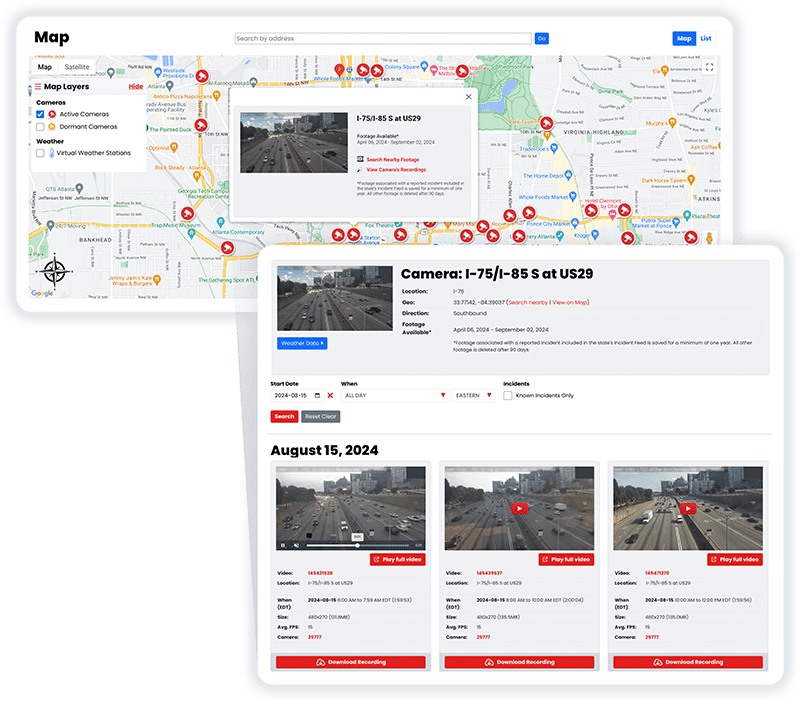
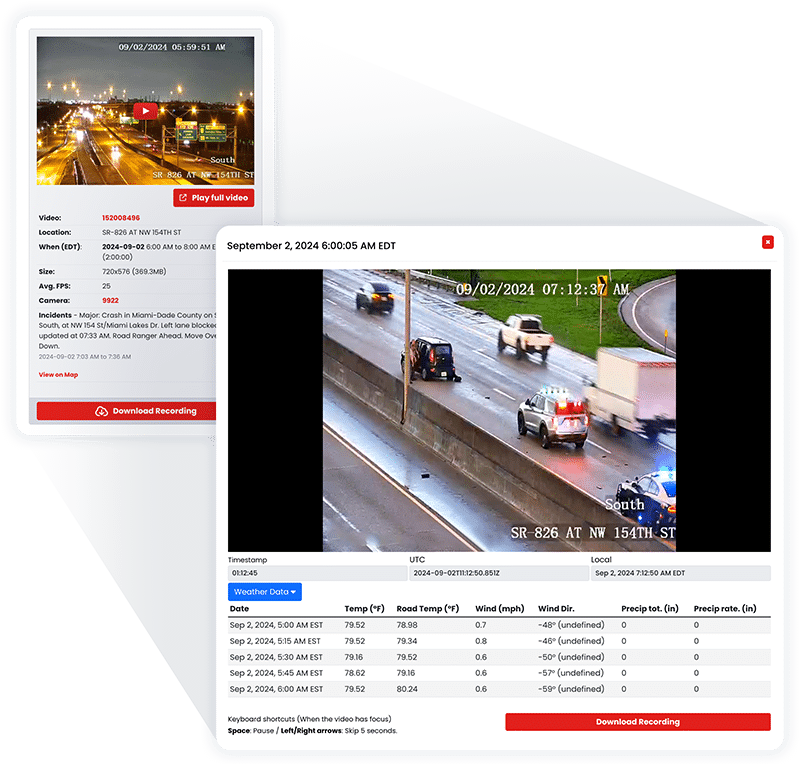
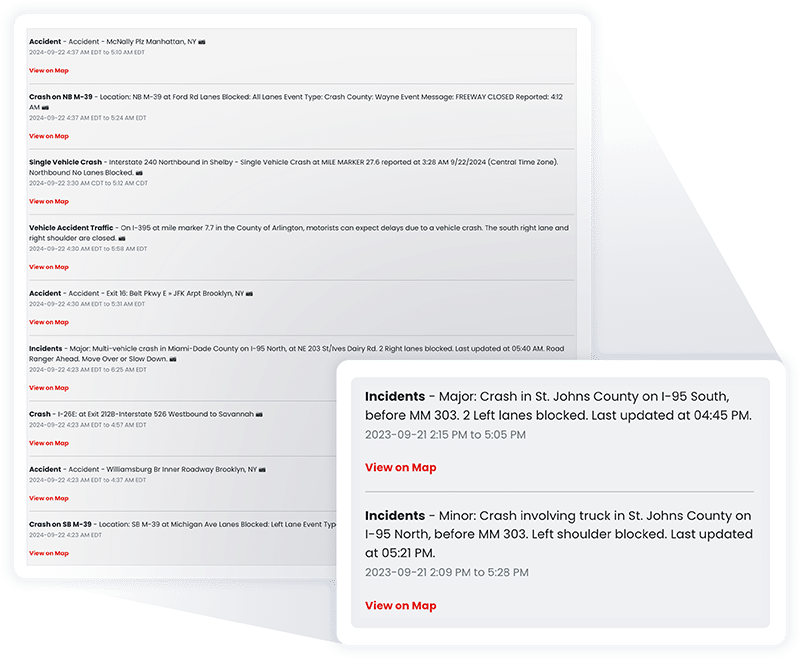
RoadProof offers a truly unique data set combining archived traffic video and a running incident feed available in most states on the system.
All of this data together allows you to get the whole picture, from the initial incident to the final outcome.
“IT WINS THE CASE. We saw the value of RoadProof immediately, you settle your cases 50% faster and for full value.”
Brian Labovick
Labovick Law Group – Florida
With our automated intelligence system, we’re able to match video footage from cameras nearby to any reported incident, and ensure that those vital video recordings are preserved in our archive for a minimum of one year.
While other systems only keep video footage for a couple of months, we keep the video footage that’s critical to your cases for much longer.
“Our case management department (which handles hundreds of cases each month) has nothing but praise for RoadProof.”
Kendra Fike
Bighorn Law – Nevada
Get started now to see how RoadProof can help you get the video data you need.
Get StartedAlready a member of RoadProof? Login here
“One of the first things I do when investigating a crash is obtain and preserve as much evidence as possible. Even before knowing all the parties involved, I immediately pull the RoadProof footage. Seeing the crash firsthand through the video is incredibly powerful. Having this video footage from the start really helps level the playing field between the plaintiff and the trucking company, which often delays or refuses to provide the truck camera video if at all.”
Jamie Mazzeo, Litigation Paralegal
The Truck Accident Law Firm – Florida


A New York traffic camera archive is also helpful in finding video evidence (of an accident) or other roadside incidents, or investigations after a “live” camera feed has left. In addition to providing lawyers, law enforcement officials, insurance professionals, and accident reconstructionists with access to archives of video footage shot by cameras supported by RoadProof, users can also search for archival footage based upon location, time, and date.
The key difference here is that most public government-operated cameras, such as those run by the New York City Department of Transportation, are intended for the purpose of monitoring real-time traffic conditions, and therefore do not have recording capabilities.
Using RoadProof, permitted users are able to locate and obtain video records using a simple search by selecting the exact location of an incident and then the specific date and time (approximate) that the incident occurred. The best searches will typically consist of:
There is no need to limit your search to just the nearest camera. There could be other cameras showing vehicles either entering the scene, changing lanes, failing to obey traffic signals, or leaving after being involved in a hit-and-run accident. Video taken at different times than the incident itself can assist in establishing a timeline.
In addition, RoadProof will match incidents reported to law enforcement with nearby cameras, preserve video related to those incidents for extended periods of time, and, based upon availability, permit users to view additional information regarding the same incident and/or weather conditions.
A live camera and an archived recording are not the same thing.
Live cameras like 511 NY are designed to show current road information in real-time. This includes current traffic patterns, construction updates, road closures, weather conditions, and road incidents. These types of cameras will assist individuals with deciding which route they should take at this moment. In most cases, these cameras do not record for future use (i.e., they do not create an archive of their feed).
Archived camera systems create archives of footage so that it can be searched later. RoadProof creates archives of footage from supported feeds, which allows approved users to search for video by location and time.
While a camera may exist at a certain intersection or roadway, there is no guarantee that useful video exists. A camera may only provide still images. A camera may face a different direction than the area where the incident occurred.
A camera may switch between views. A camera may be temporarily unavailable. Also, some cameras do not activate until a possible violation has occurred.
There is no single agency or entity that manages all traffic cameras within New York. First, you will need to find out who owns the camera to get the video footage you are looking for.
Cameras operated by NYC DOT watch many of the city’s main roads in each of the five boroughs. According to NYC DOT, this includes cameras that display current images and can be moved so they are viewing traffic from additional angles. In addition, NYC DOT states that none of their cameras for monitoring traffic capture video footage.
RoadProof may have archived independent copies of some feeds; however, it will be necessary to verify via the RoadProof map if those feeds are available.
New York State Department of Transportation (NYSDOT) monitors state highways with cameras as part of its overall traffic management plan. In accordance with NYSDOT, cameras allow them to visually assess traffic, identify potential incidents, deploy a response, and alert motorists to possible delays due to congestion.
511NY uses data provided by NYSDOT, NYC DOT, and NYS Thruway Authority and is a good resource for current traffic conditions; however, having a camera listed on 511NY does not necessarily mean the government has access to the past video recordings.
Traffic Cameras operated by the New York State Thruway Authority are located at various points along Interstate 87 (Adirondack Northway), Interstate 90 (Thruway) from the Bronx to Buffalo, Interstate 95 in the Bronx and Queens, and along Interstate 190 from Niagara Falls to Lewiston. To locate cameras near a specific interchange or highway incident, you should refer to the official Thruway Authority Traffic Camera Directory.
Cameras and Automated Enforcement Systems owned and/or operated by the Metropolitan Transportation Authority include bridge cameras; tunnel cameras; transit facility cameras; and cameras used for monitoring bus lanes. Availability of footage will depend upon both the specific camera as well as its intended use. Additionally, whether the MTA or another associated entity retains a record of activity is also determinative.
Red light and speed cameras are enforcement cameras, not general traffic monitoring cameras. They are usually activated by a potential violation rather than recording every vehicle continuously.
People who receive certain New York City camera violations can review the related images or video through the website listed on the Notice of Liability. NYC311 provides instructions for accessing evidence connected with a red light camera notice.
Unlike regular traffic monitoring cameras, red light and speed cameras are primarily enforcement cameras. As such, they are typically only active when there is an indication that a potential violation has occurred. In other words, unlike regular traffic monitoring cameras which generally operate continuously (and therefore capture all vehicles within their field of view), red light and speed cameras do not continuously monitor all vehicles traveling down a street.
If you received a Red Light Camera Violation in New York City, you can access images and/or video relating to your liability via the link provided on your Notice of Liability.
Cameras installed on private property (e.g., business establishments, residences, parking garages, etc.) as well as those mounted to commercial vehicles, delivery vehicles, buses, etc. may have recorded an incident. However, these recordings are under the control of the property owner and therefore cannot be obtained through FOIL.
RoadProof offers the ability to browse through video footage (footage that has been recorded by) cameras installed along and near the streets, highways, and well-traveled corridors in the State of New York, particularly in major metropolitan cities, but it does not offer equal access to all locations. The number of cameras tends to be significantly higher in the urban portions of New York as compared to those located in rural portions of the state. Additionally, even when there are multiple cameras in close proximity to a particular point of occurrence, they may not always be facing in a direction that would allow them to capture video evidence of that event.
Start your search immediately. There isn’t one specific time frame that applies to every camera in New York.
There are some public traffic feeds that do not record data on behalf of the entity managing it. Some entities will store recordings for a short period of time and then overwrite older ones. A private owner/manager of a business or residential area has the ability to dispose of its own security video based upon the company’s own storage policy.
RoadProof will automatically link an incident with nearby cameras, and save related videos for up to 1 year. However, searching as quickly as possible provides you with many more possibilities, especially if you have additional video to obtain from a business, home, automobile, or governmental agency.
A missing RoadProof report does not imply there are no videos available.
Identify who owns the camera(s) in question, and if they record, make a specific records request to that entity.
Expand your search area by looking at all cameras on roads the vehicles were traveling prior to and subsequent to the accident. A camera does not have to capture the crash itself to be helpful, as it can document the movement of vehicles, the operation of traffic lights, the condition of the roadway, etc.
Check with nearby businesses, residential properties, parking lots and garages, bus stops, and commercial vehicles. Obtain an agreement from the property owner/vehicle operator to save the applicable time frame while preparing for formal requests. An attorney can then decide if a subpoena or other legal action is necessary should a private owner refuse to turn over possible significant video.
Footage is useful in many cases even when it doesn’t provide a complete picture of what occurred. Footage will often depict:
Consider the camera’s field of view, the time stamp, the image interval, the light level and any obstructions that might be present. If there are multiple images taken by different cameras within the same area over time, you may be able to establish the sequence of events better using those images.
Keep your original video download as is; do not replace this with a screenshot of the video, an edited piece of the video, or a social media version. Document the source of the video; the date you downloaded it; the camera that took it; and all individuals who have handled the video file. Keep copies of any documents associated with this incident such as incident reports, weather information for the area at the time of filming (if applicable), camera locations and times.
Licensed attorneys, insurance companies, law enforcement agencies, and certain accident reconstruction specialists are granted authorized access to licensed archives on RoadProof. State and local police departments will be able to obtain access to RoadProof at no cost.
Individuals looking to use RoadProof videos as evidence of their liability for traffic citations, accidents that did not result in injuries, or for the purpose of general viewing will not be allowed direct access to the archives.
Individuals injured in a collision and currently represented by an attorney should ask their attorney to see if they can find the requested footage in RoadProof. If an individual is injured but does not have representation by an attorney, RoadProof may assist them in locating a qualified licensed attorney who represents clients in personal injury cases and can investigate the incident and attempt to locate available footage.
Begin your search for New York traffic camera footage, or inquire about professional access using RoadProof.
Get started now to see how RoadProof can help you get the video data you need.
Get StartedAlready a member of RoadProof? Login here
We will review your request within 1-2 business days and will contact you by either phone or email, or both. In the meantime, learn more about your team!