Already a member? Log into your account
Get instant access to millions of hours of recorded video & incident data from thousands of traffic cameras in Baltimore, Maryland.
Get Started TodayRoadProof is trusted by the best organizations across America.


















Are you part of a law enforcement agency? Get Roadproof now, for FREE. Click here to sign up.
With RoadProof, you can save thousands of dollars and hundreds of hours of time tracking down the video data you need, for whatever your end use case might be – whether it’s an accident case or a criminal investigation.
Recorded video data that used to take days or weeks to find can now be searched for, located, and downloaded in a matter of minutes using the platform.
“The platform continues to be vital and a remarkable tool. It’s a great asset to our agency for all of our cases.”
Master Sergeant John A. Boos
Traffic Homicide Investigation, Florida Highway Patrol – Florida
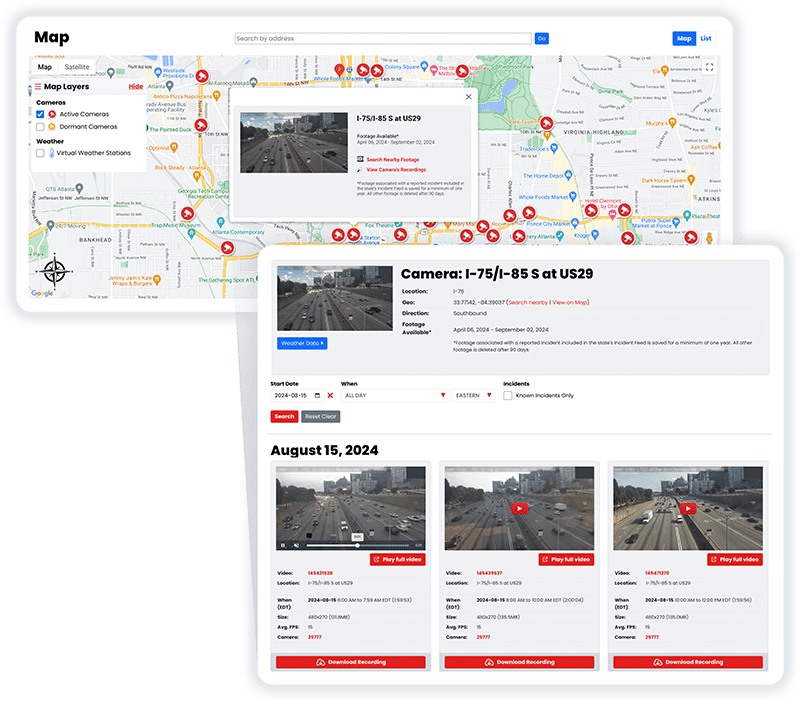
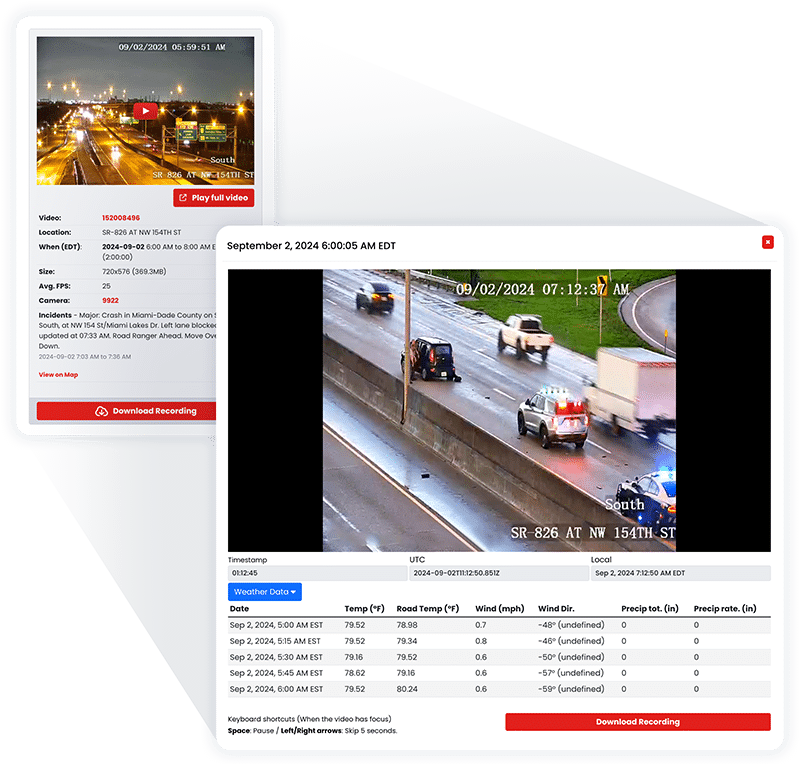
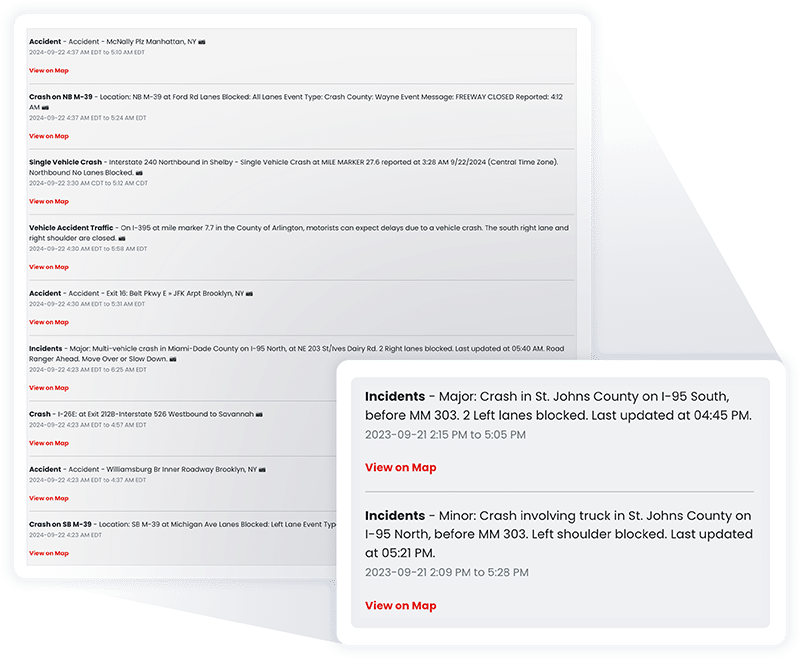
RoadProof offers a truly unique data set combining archived traffic video and a running incident feed available in most states on the system.
All of this data together allows you to get the whole picture, from the initial incident to the final outcome.
“IT WINS THE CASE. We saw the value of RoadProof immediately, you settle your cases 50% faster and for full value.”
Brian Labovick
Labovick Law Group – Florida
With our automated intelligence system, we’re able to match video footage from cameras nearby to any reported incident, and ensure that those vital video recordings are preserved in our archive for a minimum of one year.
While other systems only keep video footage for a couple of months, we keep the video footage that’s critical to your cases for much longer.
“Our case management department (which handles hundreds of cases each month) has nothing but praise for RoadProof.”
Kendra Fike
Bighorn Law – Nevada
Get started now to see how RoadProof can help you get the video data you need.
Get StartedAlready a member of RoadProof? Login here
“One of the first things I do when investigating a crash is obtain and preserve as much evidence as possible. Even before knowing all the parties involved, I immediately pull the RoadProof footage. Seeing the crash firsthand through the video is incredibly powerful. Having this video footage from the start really helps level the playing field between the plaintiff and the trucking company, which often delays or refuses to provide the truck camera video if at all.”
Jamie Mazzeo, Litigation Paralegal
The Truck Accident Law Firm – Florida


If you’re looking for traffic camera archives in Baltimore, RoadProof will connect you to a qualified personal injury attorney to determine if there are available videos from cameras at the time of your accident. Video exists only if the camera recorded and the vehicle was within view. Begin by providing the exact intersection, roadways involved, date and time (approximate) of your accident.
RoadProof’s function is to assist in finding available camera video that has been authorized to be viewed by a qualified attorney to review your case for possible claims.
If you already have an attorney, ask them to check RoadProof for recordings near your crash. If you were injured and need legal help, submit your accident details through our individual inquiry form for referral to a licensed attorney in your area.
Our individual intake process is for injury accidents. We do not provide direct video downloads to individuals or respond to individual requests involving only property damage, ticket disputes, or other noninjury matters.
Before requesting a search, gather:
Ask your current attorney to use RoadProof to find available videos near where your car crashed. Submit your accident information via our individual request form to get referred to a qualified attorney in your local area if you have no attorney and were hurt in the wreck.
We handle only personal injury type cases; we don’t download videos directly to individuals, nor do we answer requests regarding property-only damage issues, fines/ticket disputes, etc.
When making a search request, include as much detail as you know about the following:
Be sure to let us know if the time is unknown. Providing an estimate (e.g., ‘I think I called/texted this’ or ‘This photo was taken around’) is better than trying to guess exactly when something didn’t occur.
First, you should start looking at the area of the collision, then look at video that is shot from cameras in the surrounding areas. The camera that is directly next to your vehicle’s final resting place will likely NOT be showing where the collision took place.
When you are researching an incident that happened close to a harbor crossing, you want to make sure you have identified which tunnel (Fort McHenry) and what part of the tunnel they were approaching. MTA has created a directory of their traffic cameras by corridor, and it shows them as separate corridors: I-95 and the Fort McHenry Tunnel, and I-895 and the Baltimore Harbor Tunnel. Having the exact crossing can save time by avoiding having to look at the incorrect corridor.
If you know if your incident occurred on a city street, you need to provide the names of both streets that the vehicles collided on and the direction that each vehicle was traveling. If possible, also indicate whether the accident occurred within Baltimore City or Baltimore County, because just knowing a driver lives in Baltimore is not enough.
Having this information will help narrow down the search, but having access to the camera’s view and its available recordings, along with checking to see if the camera recorded during a time period relative to your incident, will still be required to confirm that RoadProof covers the camera.
Live cameras show what’s happening right now at an intersection. The video archives show footage taken by someone else in the past and stored for later use. If you find a live cam view today, it doesn’t necessarily have footage from yesterday when there was a crash.
The State of Maryland provides data on the location of public traffic cameras as well as links to active (live) feeds. These lists will likely provide the potential location where the crash occurred; however, these are NOT a database of all past crashes.
There are many other types of cameras, some that include security cameras and others that are traffic enforcement cameras, which are used for entirely different reasons. Don’t assume that if there is a speed or red light violation photo issued at this location, it is being viewed via live feed or that the owner will release their footage to RoadProof.
A Baltimore traffic camera archive search may uncover a view of the moments before impact, the collision itself, or the vehicles afterward. Even a partial recording can provide context when compared with photographs, witness statements, and the police report.
Depending on the angle and clarity, footage may help address:
In addition to looking at your accident photos, reviewing what you may find in a Baltimore traffic camera database for the time and location of your accident may show views of the seconds leading up to the crash, the actual collision, and/or the condition of each vehicle after the accident occurred. Additionally, even a short segment of video could give some insight into what happened by comparing it to your pictures, your witnesses’ accounts, and the police report.
The quality and angle of the video will determine how much information is provided about the incident. For example:
Keep in mind that video also has limitations. If the light pole facing the street is obstructed from the camera’s view; if another car blocks the actual collision from view; or if the images are too far away to read license plates. The fact that someone made a quick video clip of something does not mean that we know exactly how fast anyone was going, whether or not anyone was distracted, etc.; nor does it necessarily mean who had fault in this accident.
In general, Maryland will follow contributory negligence. Contributory negligence means if your negligence has caused or contributed to your injuries, you could be barred from recovering for those damages (even though someone else was negligent) so long as your negligence contributed to the injury.
If your insurance company alleges that you were at fault in the accident, they have made an accusation. The insurance company’s accusations are NOT the same as a court ruling on this issue. Your lawyer can assess all of the available information, question and/or dispute any unsupported claims by the insurance company, and look into any possible defenses. Any video footage taken before, during, or after the accident can assist your lawyer in their assessment of what happened; however, it could also support or refute either party’s version of events.
If someone else was negligent and caused the injury, we will determine if you have a case and how much loss the evidence shows. Video footage is used to show how the accident occurred, while your medical documents and financial records are used to demonstrate the results of that accident.
There are potential recoveries for past and/or future medical bills, lost wages, and for the emotional distress/pain & suffering from the accident. The amount of recovery depends upon the facts, the evidence to prove those facts, and legal limits.
Legal assistance may be especially important as it relates to disputed liability, continuing treatment of your injuries, multiple vehicles involved in the collision, or a governmental vehicle being involved. Our video services support the investigative process; Legal counsel will provide guidance and represent you throughout the process.
Preserve Evidence Before Filing Deadlines Become an Issue
Search for evidence as soon as possible and do not wait for an insurance issue to arise. There is not one retention date that will apply to all public cameras, all private security systems, and all commercial archives.
Ask your attorney about what recordings are available and how they may be preserved early in the process. If you already possess a video or photo that is relevant, keep a copy of the unaltered file (the “original”) and a backup. Do NOT replace the originals with cropped clips, screenshots, or social media posts.
The general civil statute of limitations in Maryland is three years after a cause of action has accrued. However, if there is a specific statute that requires otherwise, it may set forth an alternative time frame. No one is required to retain any evidence from a camera for a period of three years.
Claims against municipalities may have an earlier requirement. Discuss this matter further with an attorney so they can advise on which deadlines and requirements apply to your situation.
Possibly. A video image will likely depict at least some portion of the incident (i.e., the approaching cars, where each car was when it crossed over into the other’s path, etc.) depending on what is recorded by the camera. The camera image could prove useful in conjunction with all of the rest of the information collected at the scene.
Your lawyer may be able to identify potential additional sources such as business security cameras located near the accident site, home owner/resident security cameras, and/or dash cam mounted in another driver’s vehicle. It is very often necessary to gather testimony from witnesses, take photos of the damaged vehicles, review the physical scene, and review any documents that might have been generated as part of your claim. All of this information will then be used to determine liability and causation of injuries/damages.
No. While a video image is important evidence, it is only one type of evidence. If both sides cannot agree on the interpretation of that image, or if that image does not reveal the complete sequence of events leading up to the collision, liability, causation of injuries/damage, and/or determination of applicable coverage limits are still required to be determined.
While providing the report number and indicating what information you know is approximate versus exact would certainly assist your lawyer, you can proceed to collect information regarding time/date/location prior to receiving a completed police report.
You may contact us if you were injured and require assistance in searching for footage from Baltimore traffic cameras. Please provide your accident information via our site so we can refer your accident information to an active licensed attorney who will speak with you regarding your potential claim and also determine whether or not there is available footage of your accident. If you are currently represented by an attorney, please inquire as to whether they would like to use RoadProof’s services on behalf of their client.
The best place to start is with the most accurate possible location and date/time. The search will start from that point. It is still necessary to verify the availability of footage for your specific accident.
Get started now to see how RoadProof can help you get the video data you need.
Get StartedAlready a member of RoadProof? Login here
We will review your request within 1-2 business days and will contact you by either phone or email, or both. In the meantime, learn more about your team!